
Technical
Cara Flush DNS Cache di Windows dan Mac OS
Fungsi dari Flush DNS adalah untuk untuk melakukan perubahan record data pada komputer atau jaringan yang sedang di gunakan, agar komputer atau jaringan dapat menyesuaikan informasi perubahan-perubahan yang terjadi pada suatu Domain, DNS, Website, Name Server yang belum terlihat record data terbarunya (IP, dll ) setelah adanya perubahan atau perpindahan record data.
Untuk Flush DNS Cache di Microsoft Windows :
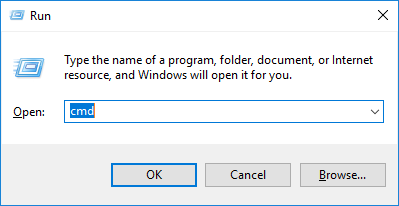
- Buka Command Prompt (CMD) dengan menekan Windows + R -> ketikan cmd
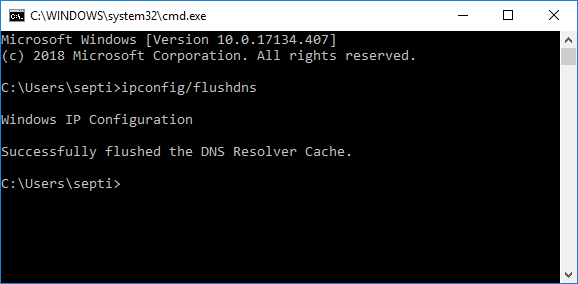
- Kemudian pada cmd ketikan ipconfig/flushdns
Untuk Flush DNS Cache di Mac OS X Leopard:
type lookupd -flushcache in your terminal to flush the DNS resolver cache.ex: bash-2.05a lookupd -flushcacheOnce you run the command your DNS cache (in Mac OS X) will flush.
Untuk Flush DNS Cache di Mac OS X:
type dscacheutil -flushcache in your terminal to flush the DNS resolver cache.ex: bash-2.05a dscacheutil -flushcacheOnce you run the command your DNS cache (in Mac OS X Leopard) will flush.